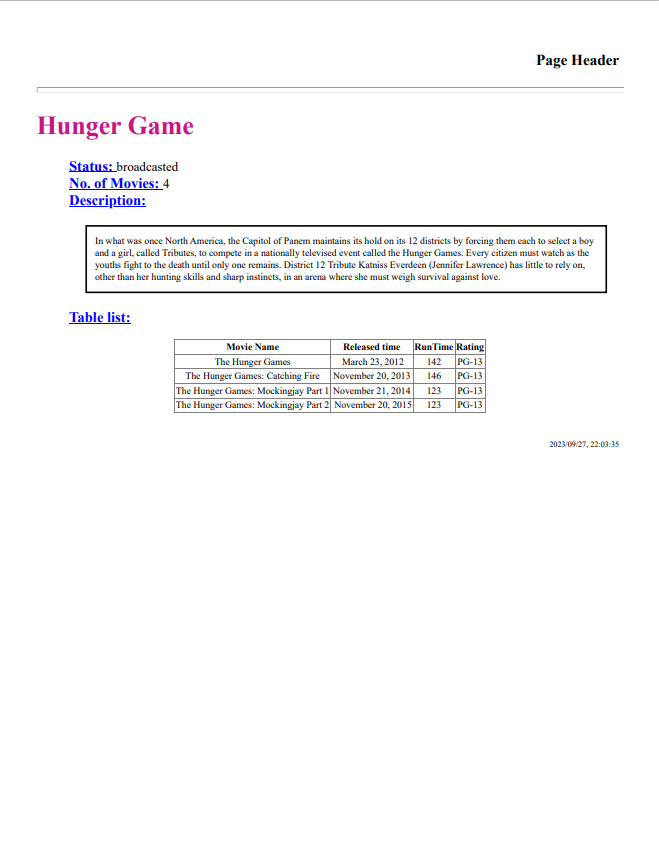
The motivation to create this script is to make visually neat and printable file for information obtained through network. To obtain the information, I actually used the developer tool in Chrome, choose Network --> Response to get all the key-value pairs saved in a file called "json.txt". In the meanwhile, there could be additional information such as .csv table and .png images in the same directory that can be added to the html content.
import json
import os
import pandas as pd
import datetime

file_path = input("What is the directory? (Make sure json.txt and table.csv are inside)")
json_file = os.path.join(file_path, "json.txt")
# Read the JSON data from the .txt file into a DataFrame
with open(json_file, 'r') as file:
    info = json.load(file)
All information needed can be retrieved by reading the dictionary 'info':
Value_1 = info[KEY_1]
Value_1 = info[KEY_2]
...
Value_N = info[KEY_N]
Now we can create the html content in python script.
# Step 1: Define a Python function to generate dynamic HTML content
def generate_dynamic_html(title, content_list, col_names, table_rows, cur_time):
    html_template = f"""
    <!DOCTYPE html>
    <html>
    <head>
        <title>{title}</title>
    </head>
    <body>
        <h3 style="text-align:right; padding: 5px;">Page Header</h3>
        <hr style="background-color:#4169E1;height:5px;">
        <h1 style="color:#C71585">{title}</h1>


        <ul style="list-style-type:none;">
            {"".join(f"<li>{item}</li>" for item in content_list)}
        </ul>
        <div style="text-align:center;">
        <table style="font-size:12px; border-collapse:collapse; margin:auto;" border="1";>
            <tr>
                {"".join(f"<th>{col_name}</th>" for col_name in col_names)}
                {"".join(f"<tr>{item}</tr>" for item in table_rows)}
            <tr>
        </table>
        </div>
        <br>
        <footer style="text-align:right; padding: 5px;font-size:10px;">
            <p>{cur_time}</p>
        </footer>
    </body>
    </html>
    """
    return html_template
# Step 2: Call the function with your desired data
page_title = info["title"]
dynamic_content = ["<span style='font-weight: bold; text-decoration: underline;font-size:18px; color:blue'>Status: </span> %s" % (info["Status"]),
                   "<span style='font-weight: bold; text-decoration: underline;font-size:18px; color:blue'>No. of Movies: </span> %s" % (info["No. of Movies"]),
                   "<span style='font-weight: bold; text-decoration: underline;font-size:18px; color:blue'>Description: </span> <div style='font-size:12px;border: 2px solid black;padding:10px;margin:20px;'>%s</div>" % (info["Description"]),
                   "<span style='font-weight: bold; text-decoration: underline;font-size:18px; color:blue'>Table list:</span> "
                   ]
#Read the table info from .csv
columns = []
rows = []
current_time = datetime.datetime.now()
print_time = current_time.strftime("%Y/%m/%d, %H:%M:%S")
try:
    df = pd.read_csv(os.path.join(file_path, 'table.csv'), dtype = str)
    df = df.fillna('-')
    columns = df.columns.tolist()
    for i in range(len(df)):
        data = ""
        for value in df.loc[i]:
            data += f"<td>{value}</td>"
        rows.append(data)

except FileNotFoundError:
    print("No table info")
# Step 3: Generate the dynamic HTML content
dynamic_html_content = generate_dynamic_html(page_title, dynamic_content, columns, rows, print_time)
# Step 4: Write the dynamic HTML content to a file (optional)
html_path = os.path.join(file_path, "print.html")
with open(html_path, "w") as file:
    file.write(dynamic_html_content)
At this step, there would be a .html file generated in the file_path directory. Please note the actual contents are masked and tweaked. Below is the example of result: